Fabric Attached Devices
SmartIO allows devices to be directly connected to the NTB fabric.
Note
Currently Fabric Attached Devices are only supported with a single host.
Note
Peer-to-peer is not yet supported with fabric attached devices. Contact support for more information.
Supported Topologies
Currently only a single host with one or more of the supported NTB host adapters is supported. Each NTB host adapter can however be connected to a wide variarity of transparent topologies. Here are some examples:
NTB host adapter connected to transparent target adapter in a PCIe backplane.
NTB host adapter connected to an MXS switch in transparent mode, which in turn is connected to more transparent switches or target adapters.
NTB host adapter connected to compatible third-party equipment.
Scanning and Enumerating Devices
To enumerate the transparent tree connected to the NTB fabric, you must first assign a unique Node ID to the tree. This mirrors how nodes in the NTB cluster are assigned Node IDs. You can think of each transparent tree as a CPU-less cluster node.
Assigning a node id and starting the enumeration is done with the
smartio_tool scan command. Make sure the NODEID parameter is unique
in the cluster.
$ smartio_tool scan 32
$ smartio_tool list
200100: PCI bridge PMC-Sierra Inc. Device 8532 [local users: 0]
200200: PCI bridge PMC-Sierra Inc. Device 8532 [local users: 0]
200300: Non-Volatile memory controller: Intel Corporation SSD [local users: 0]
If your host has multiple NTB host adapters you can specify the
adapter number as the second argument:
smartio_tool scan <NODEID> <ADAPTER NUMBER>.
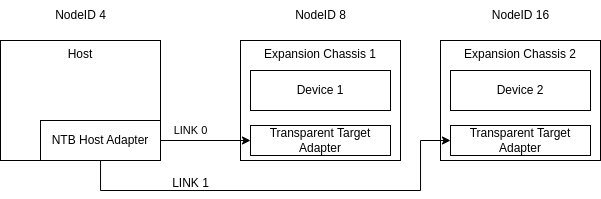
For multi-link configuration a third parameter specifies the link
number. Each adapter and link must be assigned it’s own unique nodeid.
$ smartio_tool scan 8 0 0  # Scan the first link
$ smartio_tool scan 16 0 1 # Scan the second link
Support for Hot-Plugging
Fabric attached devices have full support for hot-plugging including surprise hot plug events. The transparent chassis can be powered up and enumerated after the node has booted. The link can also be disconnected from the NTB adapter at runtime. SmartIO responds to this and triggers hot-remove events if any currently in-use device is lost. Additionally hot-plug events or link failures further down the transparent tree, for example behind a transparent switch is also handled in the same manner.