DMA
DMA data transfers are typically implemented by a separate hardware transfer function on the adapter card or within the system. This allows the CPU to do something else during the transfer, though latencies and overhead usually increase because of the time required to setup and control the DMA engine. However, several data transfers can be joined and sent together to amortize the overhead. Higher layer software may want to implement its data transfer by sending small amounts of data using PIO and larger amounts of data using DMA operations.
In this chapter, you will learn:
What a DMA queue is.
How to manage DMA queues.
How to transfer data with DMA.
Creating a DMA queue
SCICreateDMAQueue() is used to allocate and initialize a DMA queue
resource:
sci_desc_t v_dev;
sci_dma_queue_t dma_queue;
sci_error_t error;
unsigned int max_entries = 4;

SCIInitialize(...);
SCIOpen(&v_dev, ...);
SCICreateDMAQueue(v_dev,
                  &dma_queue,
                  ADAPTER_NO,
                  max_entries,
                  NO_FLAGS,
                  &error);

if (error == SCI_ERR_OK) {
    /* the queue is available */
} else {
    /* manage error */
}
As usual, v_dev is the virtual device that allows communicating with the
driver. dma_queue is the handle to the DMA queue descriptor just allocated
and initialized. ADAPTER_NO states which network adapter the DMA engine we
want to use is on. max_entries is the maximum length of the queue, so in this
case we can enqueue up to 4 data transfer specifications.
If the call to SCICreateDMAQueue() is successful, the DMA queue moves to
the IDLE state.
Removing a DMA queue
Once a DMA queue is not needed any more it can be released:
sci_dma_queue_t dma_queue;
sci_error_t error;

SCICreateDMAQueue(..., &dma_queue, ...);

/* use the queue */

SCIRemoveDMAQueue(dma_queue,
                  NO_FLAGS,
                  &error);
if (error == SCI_ERR_OK) {
    /* queue successfully released */
} else {
    /* manage error */
}
The DMA queue must not be used after it has been removed.
According to “Figure 2 - DMA queue states and transitions” on page
Figure 2 - DMA queue states and transitions, SCIRemoveDMAQueue() can
only be called if the queue is either in its initial state (IDLE) or in
a final one (DONE, ERROR or ABORTED). If the call succeeds, the queue
exits from the state diagram.
DMA queues
A DMA queue is one of the resources specified in the SISCI API and is
the fundamental mechanism to access the DMA functionality provided by
the API. Its type is sci_dma_queue and the handle to it is of type
sci_dma_queue_t. The queue is the vehicle used to pass one or more
specifications of data transfers to the DMA engine available on the
network adapter.
The state diagram for a DMA queue is shown in “Figure 2 - DMA queue
states and transitions”. A transition from one state to another is
either triggered by an API call or by an asynchronous event. Only the
transitions specified in the state diagram are legal. If an API function
is illegally called, the SCI_ERR_ILLEGAL_OPERATION error is returned.
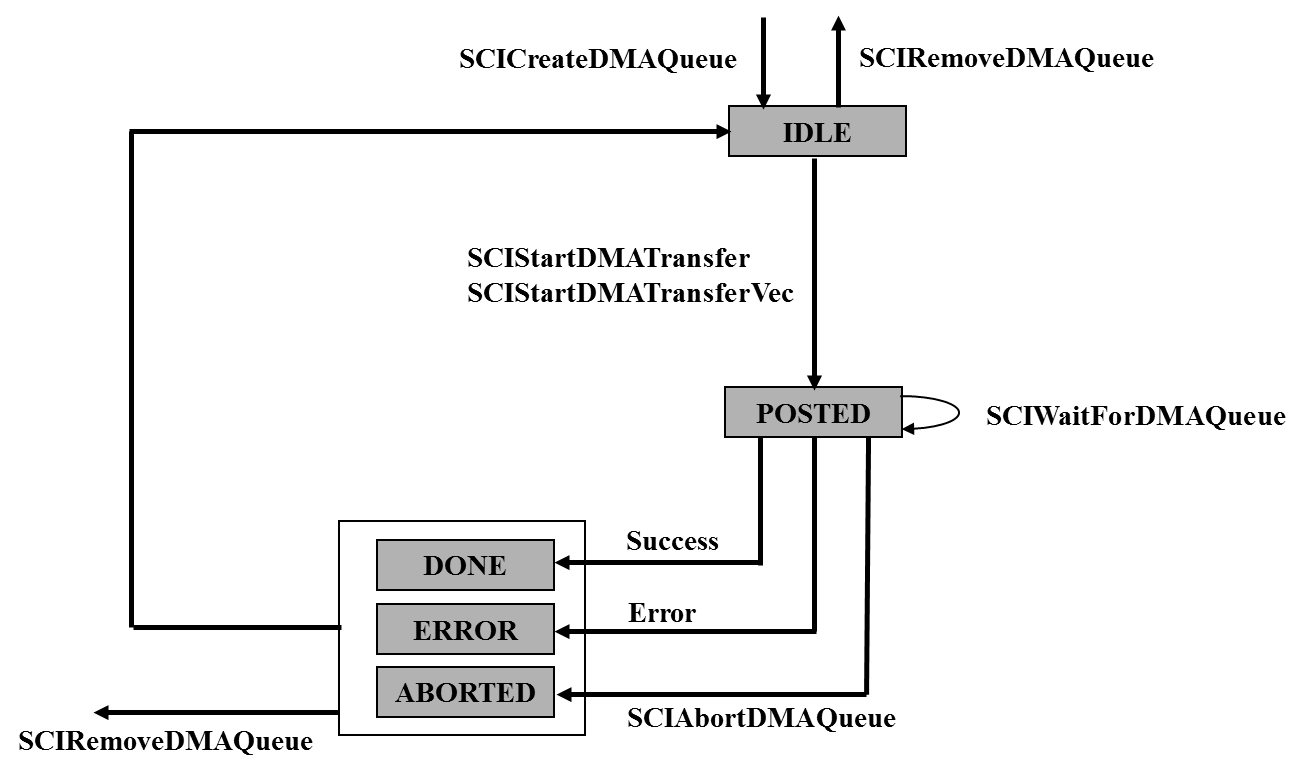
Figure 2 - DMA queue states and transitions
The meaning of the states is as follows:
IDLE: The queue has been successfully created and it is empty.
POSTED: The queue has been passed down to the DMA engine on the network adapter and it is being processed.
DONE: All the data transfers specified in the queue have been successfully completed.
ERROR: At least one of the data transfers specified in the queue has failed.
ABORTED: The program has interrupted the DMA engine while it was processing the queue.
Querying the state of a DMA queue
Before executing an operation on a DMA queue, it can be worthwhile to
query its state to be sure that the operation would be legal. This can
be done calling SCIDMAQueueState():
sci_dma_queue_t dma_queue;
sci_error_t error;
sci_dma_queue_state_t dma_q_state;

SCICreateDMAQueue(..., &dma_queue, ...);

dma_q_state = SCIDMAQueueState(dma_queue);

/* do something with the queue */
The type sci_dma_queue_state_t enumerates all the possible states a DMA
queue can be in:
typedef enum {
    SCI_DMAQUEUE_IDLE,
    SCI_DMAQUEUE_POSTED,
    SCI_DMAQUEUE_DONE,
    SCI_DMAQUEUE_ABORTED,
    SCI_DMAQUEUE_ERROR
} sci_dma_queue_state_t;
Querying the state of a queue does not affect its current state.
Starting a single DMA transfer
Once a DMA queue is available, you can use it to transfer data between a local and remote segment or between local user malloced memory and a remote segment.
A data transfer specification / DMA descriptor consists of:
A local memory segment or user malloced memory
A remote memory segment
An offset within the local segment
An offset within the remote segment
The number of bytes to transfer
The function used for sending a single block of data between two
segments is SCIStartDmaTransfer().
sci_error_t error;
sci_local_segment_t local_segment;
sci_remote_segment_t remote_segment;
sci_dma_queue_t dma_queue;
size_t local_offset = 0;
size_t remote_offset = 0;
size_t size = 4096;

SCICreateSegment(..., &local_segment, ...);
SCIPrepareSegment(local_segment, ADAPTER_NO, ...);
SCIConnectSegment(..., &remote_segment, ..., ADAPTER_NO, ...);
SCICreateDMAQueue(..., &dma_queue, ADAPTER_NO, ...);

SCIStartDmaTransfer(dma_queue,
                    local_segment,
                    remote_segment,
                    local_offset,
                    size,
                    remote_offset,
                    NO_CALLBACK,
                    NULL,
                    NO_FLAGS,
                    &error);

if (error == SCI_ERR_OK) {
    /* the transfer has been correctly started */
} else {
    /* manage error */
}
Data is by default transferred from the local segment (starting at
offset local_offset and for size bytes) to the remote segment (starting
at offset remote_offset). To transfer data from a remote segment to a
local segment, you have to specify the SCI_FLAG_DMA_READ flag.
The local segment must be “prepared” in order for the network adapter to be able to access it. Moreover, note that the local segment preparation, the remote segment connection, and the creation of the DMA queue are all consistent from the point of view of the network adapter used.
An unprepared local segment, a not connected remote segment, and invalid specification of offsets and/or size are all causes of errors (check the SISCI API specification for the details). The function call will also fail if the DMA queue is already in use (by a previous, but not completed, DMA transfer).
The SCIStartDmaTransfer() does not wait for the transfers to complete
but simply returns when the queue has been passed to the DMA engine, so
that the program can continue doing something else that doesn’t depend
on the data transfers.
With the introduction of SISCI API version 5.5.0, it is possible to perform DMA transfers with user-allocated memory buffers.
Memory buffers can either serve as the source of a DMA transfer to a remote segment, or the destination of a transfer from a remote segment.
Such transfers are started with the function SCIStartDmaTransferMem().
void *local_buffer = malloc(size);

SCIStartDmaTransferMem(dma_queue,
                      local_buffer,
                      remote_segment,
                      size,
                      remote_offset,
                      NO_CALLBACK,
                      NULL,
                      NO_FLAGS,
                      &error);
By default, this function transfers size bytes from the start of
local_buffer to the remote segment, starting at remote_offset.
The function is otherwise semantically identical to
SCIStartDmaTransfer().
Note that to maximize DMA performance, the address of local_buffer
should be aligned on a minimum of 64, and optimally PAGE_SIZE, bytes.
Starting multiple DMA transfers
If the DMA queue consists of several elements, the function
SCIStartDmaTransferVec() must be used.
The multiple transfer elements need to be organized into an array of
descriptors where each descriptor specifies each transfer similar to the
single transfer argument SCIStartDmaTransfer().
dis_dma_vec_t dis_dma_vec[num_elements];

dis_dma_vec[i].size = 128;          /* number of bytes in this transfer element */
dis_dma_vec[i].local_offset = 64;   /* offset in local segment */
dis_dma_vec[i].remote_offset = 128; /* offset in remote segment */
dis_dma_vec[i].flags = 0;           /* (0 equals to DMA_PUSH) or SCI_FLAG_DMA_READ */

SCIStartDmaTransferVec(dma_queue,
                       local_segment,
                       remote_segment,
                       number_of_transfers,
                       dis_dma_vec,
                       NO_CALLBACK,
                       NULL,
                       flags,
                       &error);
The SCIStartDmaTransferVec() does not wait for the transfers to complete
but returns simply when the queue has been passed to the DMA engine.
Waiting for DMA completion
How do we know when the processing of a DMA queue has terminated? There are several approaches to the problem, and you can choose the solution more suitable for your application.
If you want a synchronous behavior, you can just sit and wait:
sci_error_t error;
sci_dma_queue_t dma_queue;
sci_dma_queue_state_t dma_q_state;
SCICreateDMAQueue(..., &dma_queue, ...);

SCIStartDmaTransfer(dma_queue, ...);

dma_q_state = SCIWaitForDMAQueue(dma_queue,
                                 SCI_INFINITE_TIMEOUT,
                                 NO_FLAGS,
                                 &error);

if (error == SCI_ERR_OK) {
    /* the value of dma_q_state tells if the data transfers
     * have been successfull or failed */
} else {
    /* manage error */
}
If you do not want to wait forever, you can just specify another value
for the timeout, expressed in milliseconds, other than
SCI_INFINITE_TIMEOUT. In such a case, if the timeout expires, error is
set to SCI_ERR_TIMEOUT.
A call to SCIWaitForDMAQueue() is meaningful only from the POSTED state
but it is also allowed from a final state (ERROR, DONE, ABORTED), where
it is considered as a no-op. The function returns the state of the
queue, which should be either DONE or ERROR, depending on the success of
the data transfers.
Using SCIWaitForDMAQueue() is possible only if no callbacks have been
specified in SCIStartDmaTransfer().
If you don’t want to sit and wait for the completion of the DMA queue processing you can poll from time to time the queue state until it is in a final state, in particular, if it is in the DONE or ERROR states. The code would look something like the following:
sci_error_t error;
sci_dma_queue_t dma_queue;
sci_dma_queue_state_t dma_q_state;

SCICreateDMAQueue(..., &dma_queue, ...);
SCIStartDMATransfer(dma_queue, ...);

while (...) {
    /* do something */

    sci_dma_queue_state_t dma_q_state;
    dma_q_state = SCIDMAQueueState(dma_queue);

    switch (dma_q_state) {
    case SCI_DMAQUEUE_DONE:
        /* good! All transfers have completed successfully */
        break;
    case SCI_DMAQUEUE_ERROR:
        /* less good; manage the failed transfers, e.g. restart the queue */
        break;
    default:
        /* other cases */
        break;
    }
    /* do something else */
}
Finally, if you want neither to wait explicitly for the completion of the queue processing nor to poll the state of the queue, the solution for you is to use a callback mechanism, see the Events and callbacks chapter).
Aborting a DMA queue processing
If you want to stop the processing of a DMA queue you can do so by
calling the function SCIAbortDMAQueue().
The call is only meaningful from the POSTED state, but it is also
allowed from a final state (ERROR, DONE,
ABORTED) where it is considered as a no-op. In principle, the state of
the queue after a successful abort operation is ABORTED, but there is a
potential race condition if the call happens at about the same time the
queue processing is terminating and the state changes from POSTED to
DONE (or to ERROR). To know what has really happened, check the state of
the queue with SCIDMAQueueState().
sci_error_t error;
sci_dma_queue_t dma_queue;

SCICreateDMAQueue(..., &dma_queue, ...);
SCIStartDMATransfer(dma_queue, ...);

/* do something */

SCIAbortDMAQueue(dma_queue, NO_FLAGS, &error);
if (error == SCI_ERR_OK) {
    sci_dmaqueue_state_t dma_q_state;

    dma_q_state = SCIDMAQueueState(dma_queue);
    /* check the value of dma_q_state */

} else {
    /* manage error */
}
Reusing a DMA queue
A DMA queue can be reused once the transfer has completed and the state
is SCI_DMAQUEUE_IDLE, SCI_DMAQUEUE_DONE,
SCI_DMAQUEUE_ABORTED or SCI_DMAQUEUE_ERROR.
DMA example
Here we present the same example shown at the end of the previous chapter, a simple send-receive application: a sender program sends a command, this time using DMA, to a receiver program which then prints the “Hello, World!” string.
Example 5-1 shows the operations performed by the sender. Notice that it has to:
• Allocate a local memory segment, which will be the source of the DMA data transfer.
• Map that memory segment into its own address space in order to be able to initialize it.
Example 5-1. A sender program based on DMA
/* DMA based sender program */

#include "sisci_error.h"
#include "sisci_api.h"

#define RECEIVER_NODE_ID 4
#define RECEIVER_SEG_ID 4
#define SENDER_SEG_ID 4
#define SENDER_SEG_SIZE 4
#define ADAPTER_NO 0
#define NO_CALLBACK 0
#define NO_ARG 0
#define NO_FLAGS 0
#define PRINT_COMMAND 1

int main(int argc, char* argv[])
{
    sci_desc_t v_dev;
    sci_error_t error;
    sci_remote_segment_t remote_segment;
    size_t remote_segment_size;
    sci_local_segment_t local_segment;
    sci_map_t local_map;
    int* local_address;
    sci_dma_queue_t dma_queue;
    sci_dma_queue_state_t dma_queue_state;

    /* initialize the environment */
    SCIInitialize(NO_FLAGS, &error);
    if (error != SCI_ERR_OK) return 1;

    /* create a virtual device */
    SCIOpen(&v_dev, NO_FLAGS, &error);
    if (error != SCI_ERR_OK) return 1;

    /* allocate a local segment */ /* could use private segments */
    SCICreateSegment(v_dev, &local_segment, SENDER_SEG_ID, SENDER_SEG_SIZE,
                     NO_CALLBACK, NO_ARG, NO_FLAGS, &error);
    if (error != SCI_ERR_OK) return 1;

    SCIPrepareSegment(local_segment, ADAPTER_NO, NO_FLAGS, &error);
    if (error != SCI_ERR_OK) return 1;

    /* map the local segment */
    local_address = (int*) SCIMapLocalSegment(local_segment, &local_map,
                                              0 /* offset */,
                                              SENDER_SEG_SIZE,
                                              0 /* address hint */,
                                              NO_FLAGS, &error);

    if (error != SCI_ERR_OK) return 1;

    /* create the DMA queue */
    SCICreateDMAQueue(v_dev, &dma_queue, ADAPTER_NO, 1 /* max entries */, NO_FLAGS, &error);
    if (error != SCI_ERR_OK) return 1;

    /* connect to the remote segment */
    SCIConnectSegment(v_dev, &remote_segment,
                      RECEIVER_NODE_ID, RECEIVER_SEG_ID,
                      ADAPTER_NO, NO_CALLBACK, 0,
                      SCI_INFINITE_TIMEOUT, NO_FLAGS, &error);

    if (error != SCI_ERR_OK) return 1;

    /* initialize the local segment to contain the PRINT command */
    *local_address = PRINT_COMMAND;

    /* Start the DMA transfer */
    SCIStartDMATransfer(dma_queue, local_segment, remote_segment,
                        0 /* local offset */,
                        sizeof(PRINT_COMMAND) /* transfer size */,
                        0 /* remote offset */, NO_CALLBACK, NULL, NO_FLAGS, &error);

    if (error != SCI_ERR_OK) return 1;

    /* wait for the DMA queue processing to complete */
    SCIWaitForDMAQueue(dma_queue, INFINITE_TIMEOUT, NO_FLAGS, &error);
    if (error != SCI_ERR_OK) return 1;

    /* be sure the transfer has completed successfully */
    dma_queue_state = SCIDMAQueueState(dma_queue);
    if (dma_queue_state != SCI_DMAQUEUE_DONE) return 1;

    /* cleanup */

    SCIRemoveDMAQueue(dma_queue, NO_FLAGS, &error);
    if (error != SCI_ERR_OK) return 1;

    SCIUnmapSegment(local_map, NO_FLAGS, &error);
    if (error != SCI_ERR_OK) return 1;

    SCIRemoveSegment(local_segment, NO_FLAGS, &error);
    if (error != SCI_ERR_OK) return 1;

    SCIDisconnectSegment(remote_segment, NO_FLAGS, &error);
    if (error != SCI_ERR_OK) return 1;

    SCIClose(v_dev, NO_FLAGS, &error);
    if (error != SCI_ERR_OK) return 1;

    SCITerminate();

    return 0;
}
Example 5-2 below shows the operations performed by the receiver. Notice that the program is identical to Example 4-2.
Example 5-2. A receiver program based on DMA
/* receiver program */

#include "sisci_error.h"
#include "sisci_api.h"
#include <stdio.h>

#define RECEIVER_SEG_ID 4
#define RECEIVER_SEG_SIZE 4096
#define ADAPTER_NO 0
#define NO_CALLBACK 0
#define NO_ARG 0
#define NO_FLAGS 0
#define PRINT_COMMAND 1

int main(int argc, char* argv[])
{
    sci_desc_t v_dev;
    sci_error_t error;
    sci_local_segment_t local_segment;
    sci_map_t local_map;
    int* local_address;

    /* initialize the SCI environment */
    SCIInitialize(NO_FLAGS, &error);
    if (error != SCI_ERR_OK) return 1;

    /* create a virtual device */
    SCIOpen(&v_dev, NO_FLAGS, &error);
    if (error != SCI_ERR_OK) return 1;

    /* allocate a local segment */
    SCICreateSegment(v_dev, &local_segment,
                     RECEIVER_SEG_ID, RECEIVER_SEG_SIZE,
                     NO_CALLBACK, NO_ARG, NO_FLAGS, &error);

    if (error != SCI_ERR_OK) return 1;

    SciPrepareSegment(local_segment, ADAPTER_NO, NO_FLAGS, &error);
    if (error != SCI_ERR_OK) return 1;

    /* map the local segment */
    local_address = (int*)SCIMapLocalSegment(local_segment, &local_map,
                                             0 /* offset */,
                                             RECEIVER_SEG_SIZE,
                                             0 /* address hint */,
                                             NO_FLAGS,
                                             &error);

    if (error != SCI_ERR_OK) return 1;

    /* initialise the first word of the to-be- accessed segment */
    *local_address = ~PRINT_COMMAND;

    /* export local segment */
    SCISetSegmentAvailable(local_segment, ADAPTER_NO, NO_FLAGS, &error);

    if (error != SCI_ERR_OK) return 1;

    /* wait for the sender process to send the print command */
    while (*l_addr != PRINT_COMMAND) ;

    printf("Hello, World!\\n");

    /* cleanup */
    SCISetSegmentUnavailable(local_segment, ADAPTER_NO, NO_FLAGS, &error);
    if (error != SCI_ERR_OK) return 1;

    SCIUnmapSegment(local_map, NO_FLAGS, &error)
    if (error != SCI_ERR_OK) return 1;

    SCIRemoveSegment(local_segment, NO_FLAGS, error);
    if (error != SCI_ERR_OK) return 1;

    SCIClose(v_dev, NO_FLAGS, &error);
    if (error != SCI_ERR_OK) return 1;

    SCITerminate();

    return 0;
}