Fabric Attached Devices (NTB Hot-Add)
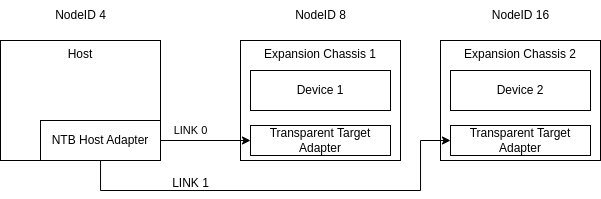
SmartIO can enumerate and use devices directly connected to an NTB adapter. This is conceptually very similar to using a transparent host adapter, but with SmartIO enumerating the devices instead of the Operating System. This has multiple benefits including improved support for surprise hot-add and hot-remove and increasing the number of devices that can be enumerated by a system.
Requirements
You must have a host with one or more supported Dolphin NTB adapters installed.
The host must be on a platform that support borrowing.
You must configure a large enough NTB prefetchable size to map the BARs of the devices.
The host must be running an operating system that supports borrowing.
The Dolphin NTB adapter must be connected to a transparent target adapter or expansion chassis.
eXpressWare Installation
Run the eXpressWare installer with --install-node and --enable-smartio.
When installing eXpressWare, make sure to request installation of SmartIO,
either interactively or by passing the --enable-smartio argument. Please refer
to the installation guide for more details.
Enumerating the devices
Before you can use the devices connected to the Dolphin NTB adapter the devices
must be enumerated. This is performed using the smartio_tool scan
command. After enumeration the fabric attached devices are available to use
with SmartIO. Refer to Fabric Attached Devices for details.
Borrowing devices from the Pool
After enumeration the fabric attached devices can be borrowed by the host and
be used like a local device. You can list the available devices with
smartio_tool list and then borrow a device with smartio_tool borrow.
To automatically borrow all the devices you can enable the auto borrow
functionality by running smartio_tool config autoborrow_transparent 1 before
running the scan command.
See Using Native Device Drivers for more details.
Using devices
After borrowing the devices will operate as a local PCIe device. This means that you can use it the same way you would use a local device. For example, an NVMe drive can be mounted and an NVIDIA GPU can be used to run cuda applications.