IntervalZero RTX64
This guide shows how to install, configure, execute and develop programs on IntervalZero RTX64 systems.
RTX64 - RealTime eXtensions - is a subsystem running on most of the CPU cores in tandem with Windows, whose kernel has allotted a few. The realtime kernel consists of a scheduler and memory manager that enable applications to run without performance penalties germaine to a native OS.
IO and memory mapping, PCIe enumeration, interrupts are available, as well as mechanisms to communicate between RTSS and the host OS.
Software development takes place in Visual Studio. RTSS programs run in CPL 0, with an exception handler configured to freeze the process.
eXpressWare RTX stack has the native drivers cumulated into one,
implemented as a rtdll. The driver is loaded by
rtx_load.rtss process. rtss SISCI_API
consumers link to sisci_api.lib import library. Tuning
parameters can be set inside dis_<adapter.conf and
dis_irm.conf, located in \Windows\System32\drivers\etc\DIS.
System Requirements
The RTX driver is available for MXH530 PCIe 5.0 NTB Host Adapter, MXH570, MXH930 PCIe 4.0 NTB Host Adapter, PXH830, PXH810, IXH610 non-transparent adapters.
There are no software requirements beyond RTX64 subsystem demands.
1 adapter per host is supported. Dual NTB is supported on PX. Direct and switch cabling topologies are supported. EEPROM upgrade is supported. Heterogenous OSs are supported.
Installation
Launch powershell with elevation and execute
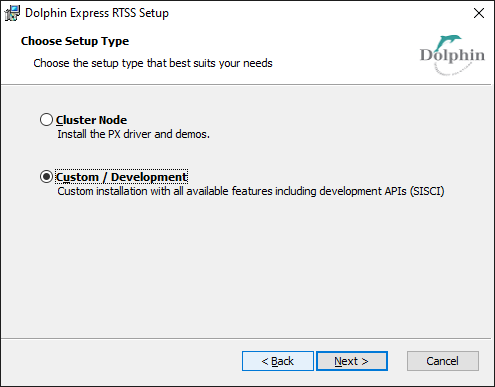
Dolphin_eXpressWare-Windows_RTSS_x86_64-<adapter>-<version>.msi.
Select either Cluster Node to install the driver, or Custom for
SISCI_API SDK.
Note
For MX adapters, an additional PCIe filter driver is installed. Consequently, the OS restarts all PCIe devices, prolonging the installation time. A system reboot can be solicited.
Configuration
RtssStack.ps1 script manages the driver. Use Get-Help RtssStack.ps1 -Full
for an overview.
Each system is configured based on an increasing index.
Launch powershell with elevation:
cd "${env:ProgramFiles}\Dolphin Express RTSS";
.\RtssStack.ps1 -Configure 1;
The setting above is persistent. Multiple systems are configured with:
$hosts = "ComputerA", "ComputerB";
New-PSSession -ComputerName $hosts;
$index = 1;
$hosts | foreach {
    Invoke-Command (Get-PSSession -ComputerName $PSItem) -ArgumentList $index {
        param($index);

        cd "${env:ProgramFiles}\Dolphin Express RTSS";
        .\RtssStack.ps1 -Configure $index;
    }
    $index ++;
}
Start the driver
Use .\RtssStack.ps1 -Start <core> to start the
driver. The core supplied is controlled by RTX64. Prompt elevation
is not required.
.\RtssStack.ps1 -Start 2

Please wait until the RTX_PX driver is loaded. The message 'The PX functions are started.'
will be printed on the server console ..... The driver is loaded.

The PX adapter installed on this machine has NodeId 4. Benchmarks or samples running on
any remote machine should pass '-rn 4' as parameters to have this adapter's memory as
destination.

Before running 64 bit SISCI RTX programs, copy sisci_api.rtdll on the directory where the
application resides. The RTDLL is installed in
    "C:\Program Files\Dolphin Express RTSS\Demo\sisci_api.rtdll".

The RTX_PX driver and the SISCI_API process run on CPU core 2. It is strongly recommended
that processes using the SISCI_API interface run on a different CPU core. Use the
    RTSSrun.exe /a '(<core>)' <program.rtss> <arguments>
syntax to allocate a dedicated core as in:
    RTSSrun.exe /a '(3)' "C:\Program Files\Dolphin Express RTSS\Demo\scibench2.rtss" -server -rn 8
Note
Platform firmware can grant native PCIe control to the operating system. If
kernel DMA protection or IOMMU virtualization is enabled, then remote
memory writes can be trapped, resulting in system failure. Launch
.\RtssStack.ps1 -Verify.
.\RtssStack.ps1 -Start 2
The operating system can apply IOMMU mitigations on PCIe endpoints. Rerun the script with -Verify.

.\RtssStack.ps1 -Verify
[00:01.0] PCI\VEN_8086&DEV_1901&SUBSYS_07A31028&REV_06\3&11583659&0&08 root port grants IOMMU
protection to the operating system for device underneath.
1. Place the adapter in different slot
- [01:00.1] PCI\VEN_11F8&DEV_4036&SUBSYS_093011C8&REV_00\000043470000008901
or
2. Disable Kernel DMA Protection or Intel VT-d in the BIOS = system firmware.
Verify that the driver is operational
Test the PCIe topology using scipp.rtss or any other demos.
On node whose index is 1, use
RTSSrun.exe /a '(3)' "${env:ProgramFiles}\Dolphin Express RTSS\Demo\scipp.rtss" -server -rn 8
to target node with index 2. On node 2, use
RTSSrun.exe /a '(3)' "${env:ProgramFiles}\Dolphin Express RTSS\Demo\scipp.rtss" -client -rn 4
The RTX Console displays:
C:\Program Files\Dolphin Express RTSS\Demo\scipp.rtss compiled May  2 2017 : 15:04:46

Test parameters for client
--------------------------------------------------------------
Local nodeId            : 8
Remote nodeId           : 4
Local adapter no        : 0
Inner loops to execute  : 100000
Key Offset              : 1729
Data copy function      : CPU store 4
SISCI API               : SISCI API version 2.0.1 (  May  2 2017 )
Adapter type            : PXH810-000341
--------------------------------------------------------------

Local segment (id=0x806c1) is available for remote connections.
Connect to remote segment (id=0x1040ec1) ....
Remote segment (id=0x1040ec1) is connected.

Waiting for CMD_READY from server.
Handshake complete, moving on!

Ping Pong data transfer:
  size       retries  latency (usec)  latency/2 (usec)
     0           499           1.118             0.559
     4           492           1.124             0.562
     8           495           1.136             0.568
    16           509           1.168             0.584
    32           526           1.218             0.609
    64           550           1.303             0.652
   128           589           1.444             0.722
   256           667           1.732             0.866
   512           808           2.280             1.140
  1024          1107           3.413             1.706
  2048          1575           5.666             2.833
  4096          2633          10.182             5.091
  8192          4886          19.284             9.642

Test completed.
Close driver
Driver is closed with
.\RtssStack.ps1 -Terminate
Heterogenous OSs
RTX systems can communicate over PCIe with a system running Windows or
Linux. The remote system requires 2 features to be set inside
\Windows\System32\drivers\etc\DIS\dis_irm.conf or
/opt/DIS/lib/modules/dis_irm.conf. Restart the system to apply.
sessionHeartbeatsEnabled=0;
linkWatchdogEnabled=0;
SISCI API Development
Sample code is located in ${env:ProgramFiles}\Dolphin Express RTSS\Examples\c-programs.
In Visual Studio IDE:
use the wizard to create a Rtx Application project
add one of the samples to the project as a starting point
open the Project Properties
add
$(ProgramFiles)\Dolphin Express RTSS\Include;\$(ProgramFiles)\Dolphin Express RTSS\Include\disto the C++/General/Additional Include Directoriesadd
$(ProgramFiles)\Dolphin Express RTSS\Libto the Linker/General/Additional Library Directoriesadd
sisci_api.libto the Linker/Input/Additional Dependencies
A mockup project is generated with
& "${env:ProgramFiles}\Dolphin Express RTSS\Examples\CreateVcxproj.ps1" -Name UserSupplied;
When SISCI_API calls are issued from an arbitrary thread, the start
function must use sisciSupportRtxInitialize ahead of all
calls and sisciSupportRtxTerminate before returning. These
extensions are declared in sisci_support.h.
Warning
RTSS programs must cover error paths. Automatic handle cleanup is not available.
#include <sisci_api.h>
#include <sisci_support.h>

DWORD WaitArbitrary(void *arg)
{
    DWORD r = 1;

    sisciSupportRtxInitialize(NO_FLAGS, &error);
    if (error != SCI_ERR_OK) {
        return r;
    }

    ...
    SCIWaitForDataInterrupt(localInterrupt, msg, &length,
        SCI_INFINITE_TIMEOUT, NO_FLAGS, &error);
    if (error != SCI_ERR_OK) {
        goto Cleanup;
    }
    SCIProbeNode(sd, 0, nodeId, NO_FLAGS, &error);
    ...

    r = 0;
Cleanup:
    sisciSupportRtxTerminate();
    return r;
}

int main(int argc, char *argv[])
{
    SCIInitialize(NO_FLAGS, &error);
    ...
    th = CreateThread(NULL, 0, WaitArbitrary, &tmsg, 0, NULL);
    WaitForSingleObject(th, INFINITE);
    CloseHandle(th);
    ...
    SCITerminate();
    return 0;
}
Support
Open a case with Support Portal. Specify
the baseline: RTX64 version, CPU model. Attach the output of
rtx_load.rtss process and of
& "${env:ProgramFiles}\Dolphin Express RTSS\Util\dis_diag.exe" -V 9